AI Image Generation
This is my general guide to AI image generation. It covers how the models work at a high level, the different types, a bit of history, what you actually get from ChatGPT and how to build image generation into your own code and agents.
It’s based on my own experiments calling a handful of image providers from Python. I’ve generated pixel art sprites, photorealistic card table backgrounds and a series of restaurant posters, trying to make one that doesn’t look AI generated. Every image here came from those experiments.
- TLDR
- A short history
- How it works
- Types of image generation
- Ways to use it
- What you get with ChatGPT
- What it costs
- Prompting that works
- Pixel art
- Integrating image generation into a coding project
- Integrating with an agent
- Glossary
- Resources
TLDR
- Most models start from noise and clean it up. Text steers the clean-up. Newer models also plan the image the way a chat model plans a sentence.
- You pay for the canvas, not the content. A plain wooden table costs the same as a detailed oil painting of the same size.
- ChatGPT is the easiest way in and the hardest to control. Great for one-off images and conversational edits. For anything repeatable you want the API.
- Prices vary more than 100 times over. Anything from a fraction of a cent to 15 cents or more per image. Running a model locally costs nothing. The cheapest model isn’t always the cheapest result.
- The APIs move under you. Models get retired with weeks of notice and providers quietly ignore parameters. Keep the model in config and log what you actually got back.
- Describe how it was made, not how it should look. Camera, film, print process and layout get better results than “stunning” and “hyper-detailed”.
- Spelling and fingers are no longer the giveaway. The tell now is taste. Too much glow, too much drama and nothing allowed to be plain.
- Agents are good at this. A multimodal agent can write the prompt, call the API, look at the result and try again. You still need to supply the taste.
- The best pipelines are hybrids. Let AI do the creative part. Let ordinary code do the exact parts like sizing, transparency, palettes and layout.
A short history
- 2014 - GANs. Ian Goodfellow’s generative adversarial networks pit two networks against each other, one making images and one spotting fakes. They go on to produce convincing synthetic faces but are hard to steer with text.
- 2015 - DeepDream. Google’s Inceptionism experiments turn image recognition inside out. The results are full of psychedelic dog faces, because the network was trained on a dataset with a lot of dogs in it.
- 2018 - AI art goes to auction. A blurry GAN portrait called Edmond de Belamy sells at Christie’s for $432,500, more than 40 times its top estimate.
- 2019 - Faces that don’t exist. NVIDIA’s StyleGAN powers thispersondoesnotexist.com, a new photorealistic fake face on every refresh.
- 2021 - DALL-E. OpenAI links text and images in one model. You can type a sentence and get a picture, even if it’s a small, blurry one.
- 2022 - The breakout year. DALL-E 2, Midjourney and Stable Diffusion all arrive within a few months. Stable Diffusion is open source and runs on a gaming PC with about 7GB of video memory, which kicks off a huge community of fine-tunes and tools.
- 2023 - Photorealism and readable text. A Midjourney image of the Pope in a white puffer jacket fools much of the internet. Ideogram launches with text you can actually read. SDXL raises the bar for open models and DALL-E 3 moves into ChatGPT.
- 2024 - Flux and the backlash. Former Stable Diffusion researchers found Black Forest Labs and release Flux, which becomes the default open-weight model. Meanwhile AI posters become a byword for cutting corners (more on that below).
- 2025 - Native image models. OpenAI builds image generation into GPT-4o itself and the “Studio Ghibli” trend takes over social media. Google’s Gemini 2.5 Flash Image, nicknamed Nano Banana, makes conversational editing cheap at $0.039 an image.
- 2026 - Abundance and churn. OpenAI switches off DALL-E in its API. OpenRouter alone lists over 60 image models from a dozen companies, and older models are retired every few months.
Six fingers and gibberish text
For a few years the easiest way to spot an AI image was to count the fingers or try to read the sign in the background. Both problems are now mostly fixed, and why they happened says a lot about how these models work.
Hands are complicated, flexible and usually partly hidden in photos. Behind a cup, in a pocket, half out of frame. The models learned what hands look like as a texture, not how many fingers they have. Midjourney v5 in March 2023 was widely reported as the turning point. Experts suspected better curated training data with clearer pictures of hands, plus bigger models and higher resolutions. It wasn’t perfect. People in the background still had alien anatomy for a while.
Text had a more specific cause. Most models read your prompt through a tokeniser that splits it into chunks of words rather than letters. The model never sees that “chocolate” is spelled c-h-o-c-o-l-a-t-e, so it can’t draw it letter by letter. A 2022 paper, Character-Aware Models Improve Visual Text Rendering, showed that giving the model access to individual characters fixed much of the problem. Ideogram, whose team included former Google Imagen researchers, made text a selling point in 2023. By 2025 the multimodal models from OpenAI and Google, which understand language as well as any chatbot, had made readable text normal.
The fix arrived in stages, and the old problem leaked into the real world in between. The Willy’s Chocolate Experience in Glasgow in February 2024 promised “a pasadise of sweet teats” on its AI-generated posters. Long text is still not completely solved. In December 2025 Nano Banana Pro turned “Lived experience” into Liver experience on an otherwise good infographic.
How it works
You don’t need the maths to use these models well. You do need a rough picture of what’s going on, because it explains most of the surprises.
Diffusion models
Most image models are diffusion models. During training they learn to remove noise from images. Take a photo, add a bit of static and teach the model to predict what the clean version looked like. Repeat billions of times at every level of noise.
To generate, you run that in reverse. Start from pure static and remove a little noise at a time over a number of steps. A text encoder turns your prompt into numbers that steer each step towards an image that matches it.
Two details matter in practice.
- They work in a compressed space. Latent diffusion, the approach behind Stable Diffusion, paints on an internal canvas about 8 times smaller on each side than the final image, then decodes it. That’s why you can’t ask for a 32 x 32 image. The internal canvas would be 4 x 4.
- Steps cost time. More steps is slower and usually better, up to a point. “Distilled” models like Flux Schnell and SDXL Turbo are trained to get a good image in 4 steps instead of 30.
Multimodal models
The newer approach puts image generation inside a model that also understands language. Because the same model reads your prompt and makes the picture, these are much better at following instructions, rendering text and editing an image you give them. GPT Image, Gemini’s image models and Meta’s Muse work this way. Some reason about the layout before they draw, which makes a real difference when the prompt is about where things go.
Are multimodal models diffusion under the hood?
Often partly, and the line is blurrier than the marketing suggests.
OpenAI’s launch post for GPT-4o image generation hints at a hybrid. A language model plans the image as a sequence of tokens, the same way it writes a sentence, and a diffusion-style decoder paints the final pixels. Google hasn’t published how its Gemini image models work. Going the other way, modern “diffusion” models like Flux use transformer blocks that process text and image together, which is the same building block as a chat model.
So the useful distinction isn’t the maths. It’s how deeply the image model understands language. That’s what gives you instruction following, readable text and editing.
How they compare
| Diffusion models (Flux, SDXL, Imagen) | Multimodal models (GPT Image, Gemini, Muse) | |
|---|---|---|
| What drives cost | Resolution and number of steps | Image tokens, usually fixed per size and quality tier |
| Strengths | Cheap, fast, runs locally, seeds give repeatable results | Follows instructions, renders text, edits from a reference image |
| Weaknesses | Takes prompts more literally | Often no seed control and a fixed output size |
| Open weights? | Often | Rarely |
Seeds
The random static a diffusion model starts from is set by a seed. Same seed, same prompt and same model gives the same image. That’s what makes batches repeatable. Many hosted models ignore or reject seeds, so don’t build anything that depends on them without checking.
Types of image generation
“Image generation” covers several different jobs. Most providers support some of them, not all.
| Type | What it does | Example use | Where to try it |
|---|---|---|---|
| Text to image | A prompt becomes a picture | Concept art, backgrounds, placeholders | OpenAI image guide |
| Image editing | “Make the mug blue” on an existing image | Iterating on a design without starting again | Gemini image docs |
| Reference images | Keep a character, product or style consistent | The same knight in eight poses | Gemini image docs |
| Inpainting | Regenerate one masked area | Removing an object, fixing a hand | Diffusers inpainting guide |
| Outpainting | Extend an image past its edges | Turning a square into a banner | ComfyUI inpaint and outpaint examples |
| Structural control | Follow a sketch, pose or depth map | Matching a layout exactly | ControlNet and the Diffusers ControlNet guide |
| Fine-tuning (LoRA) | Teach an open model a new style or subject | A consistent house style or product | Diffusers LoRA training |
| Upscaling | Add detail at a higher resolution | Finishing the keepers from a cheap batch | Real-ESRGAN |
| Background removal | Cut the subject out | Transparent sprites and product shots | rembg |
| Text to vector | Produce SVG instead of pixels | Icons and logos | Recraft |
Tileable textures are worth a special mention. Plain models won’t reliably produce a seamless tile. You need a model or LoRA trained for it or a tiling option in the tool.
Ways to use it
| Route | Examples | Good for | Watch out for |
|---|---|---|---|
| Chat apps | ChatGPT, Gemini | One-off images, quick edits | Little control, usage limits |
| Creative tools | Midjourney, Adobe Firefly, Canva | Designers, polished results | Subscriptions, hard to automate |
| Direct APIs | OpenAI, Google Gemini and Vertex AI | Production code | Each API is different |
| Aggregators | OpenRouter, Replicate, fal.ai | Trying many models with one key | Markup on some, models come and go |
| Local | Flux or SDXL with mflux or ComfyUI | Free bulk generation, full control | Needs a decent GPU or Apple Silicon, slower |
For my experiments I deliberately avoided subscriptions. Everything was pay per image through an API or was run locally.
What you get with ChatGPT
Most people’s first experience of AI images is typing a request into ChatGPT. It’s worth knowing what you’re getting.
ChatGPT uses OpenAI’s own GPT Image models, which have been built into the chat since March 2025.
Is DALL-E still a thing? Not really. DALL-E 3 was ChatGPT’s image generator from October 2023 until the switch to GPT-4o image generation in March 2025. OpenAI then removed DALL-E 2 and 3 from its API on 12 May 2026. The name lives on mostly as a generic term for AI images.
What it’s good at
- Conversation. You can say “warmer light” or “move the mug to the left” and it edits rather than starting again.
- Following instructions. It handles layouts, counts and specific details better than older diffusion models.
- Text. Signs, posters and labels are usually spelled correctly.
- References. Upload a photo or sketch and it will work from it.
What it’s not good at
- Control. You get a handful of aspect ratios, no seed and no way to run a batch. You can’t ask for exactly 1024 x 512.
- Speed. Each image takes anything from a few seconds to over a minute, and there are usage limits, especially on the free plan.
- A house style. Left to itself it drifts towards a recognisable look. The 2025 model was known for a warm yellow cast nicknamed the “piss filter”. Describe the lighting and colour you want rather than leaving it to the defaults.
- Content rules. It will refuse some requests, like real public figures in certain contexts or close copies of copyrighted characters.
Provenance. OpenAI adds both C2PA metadata and a SynthID watermark to its images, according to its help centre. Google adds SynthID to Gemini images. Metadata is easily stripped. Watermarks survive screenshots better, but neither is something to rely on if you’re trying to prove an image is or isn’t AI.
ChatGPT or the API? The same family of models is available through OpenAI’s API, billed per image. The API gives you sizes from a fixed list, quality tiers, batching from code and, on some models, transparent backgrounds. If you need more than a few images or the same kind of image repeatedly, use the API. The Gemini app versus the Gemini API is the same story.
What it costs
You pay for the canvas
The most useful mental model I’ve found is a painter who only owns large canvases, charges per canvas and paints every square inch with the same care. A flat blue sky gets as much effort as a face.
- Simple pictures aren’t cheaper. The model does the same work across the whole image.
- You can’t generate small. Models work best at roughly 512 to 1600 pixels. For a 32 x 32 sprite you generate a big picture and shrink it yourself.
- Asking for a smaller size often doesn’t help. Gemini 2.5 Flash Image returned 1024 x 1024 when I asked for 512 x 512, at the same flat price.
Four ways you get billed
| Billing model | Examples | Does making it smaller help? |
|---|---|---|
| Flat per image | Gemini 2.5 Flash Image, Recraft | No |
| Per image, tiered by size and quality | Newer Gemini models, OpenAI GPT Image | A little. The smallest tier is still a big canvas for most needs |
| Per megapixel or GPU-second | Replicate, fal.ai, most models on OpenRouter | Yes |
| Your own electricity | Local Flux | Yes, and speed is what you save |
The landscape in October 2026
| Option | Approx. cost per image | Good for |
|---|---|---|
| Local Flux Schnell | $0, plus your time | Prompt iteration and bulk batches |
| Flux Schnell on Replicate or fal.ai | ~$0.003 | Cheap cloud batches |
| Recraft V4.1 Flash (OpenRouter) | ~$0.007 | Fast, cheap illustration |
| FLUX 3 Image Klein (OpenRouter) | ~$0.009 | Cheap photorealism |
| Meta Muse Image (OpenRouter) | ~$0.01 | Following layout instructions |
| OpenAI GPT Image 1.5 | $0.009 low, $0.034 medium, $0.133 high | Quality tiers from OpenAI |
| Gemini 2.5 Flash Image | ~$0.039, half that via the Batch API | Edits and character consistency |
| Nano Banana 2 (Gemini 3.1 Flash Image) | ~$0.045 at 0.5K, ~$0.067 at 1K | Newer and better, but pricier |
| Nano Banana Pro (Gemini 3 Pro Image) | ~$0.134 and up | Final, hero quality |
Newer flagship models cost more per image, not less. The cheap end of the market is open-weight models and the “flash”, “mini” and “lite” tiers. OpenRouter’s model list is the easiest place to compare current prices.
Cost per usable image
Price per image is misleading on its own.
cost per usable image = (price per image x attempts needed) + your time
A free local model that needs ten tries can lose to a $0.039 model that gets it right first time. In my experiments a model costing a tenth of a cent more saved several retries.
Prompting that works
Describe the camera, not the view
I wanted card table backgrounds for a game. That meant a table seen from directly above, with a few props around the edges and the middle kept clear for the cards.
Asking for “seen from directly above” isn’t enough. Models learn from photos, and most photos of tables are taken at an angle. My first attempts came back as nice pictures of a table with a wall and a window behind it, and every prop bunched down one side.
Two changes fixed most of it.
- Describe the camera. “An orthographic flat lay. The camera points straight down at the tabletop, with no perspective and no horizon. The table surface fills the entire frame edge to edge. No walls, windows, floor or table edges are visible.”
- Spell out where things go. “Spread these around all four edges (top, bottom, left and right) rather than bunching them on one side or in the corners. Each one should be small and cut off by the edge of the image.”
Here’s the same prompt for a pine kitchen table, with both changes, run on two different models.
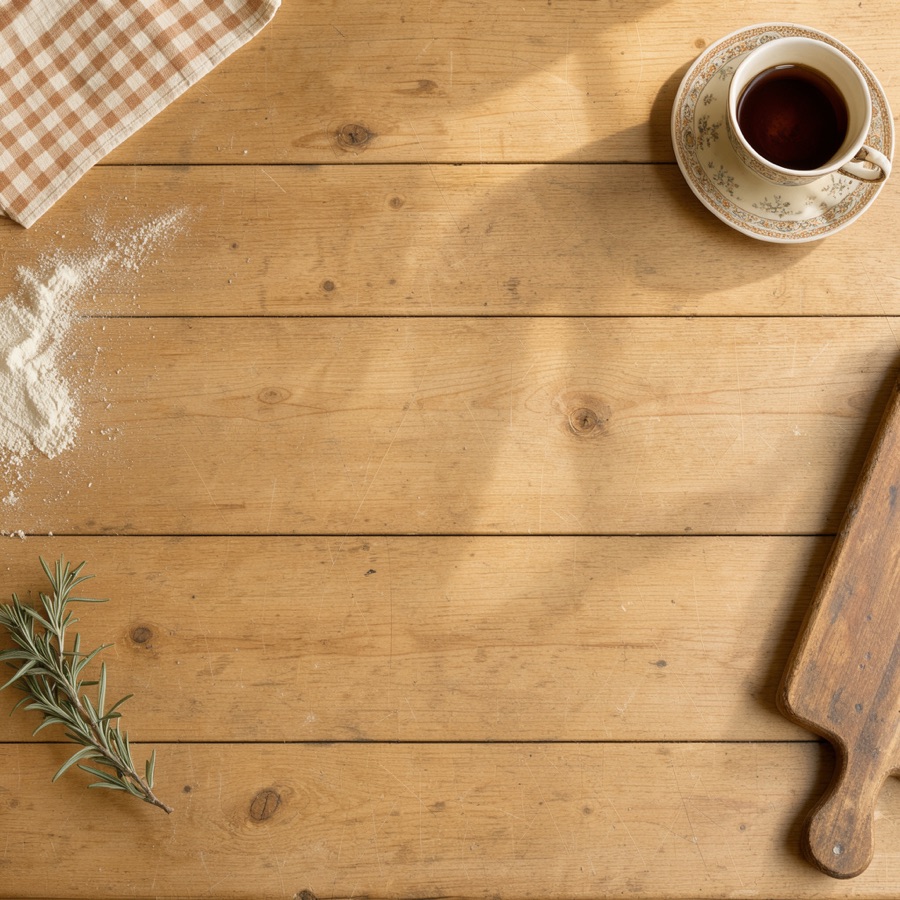
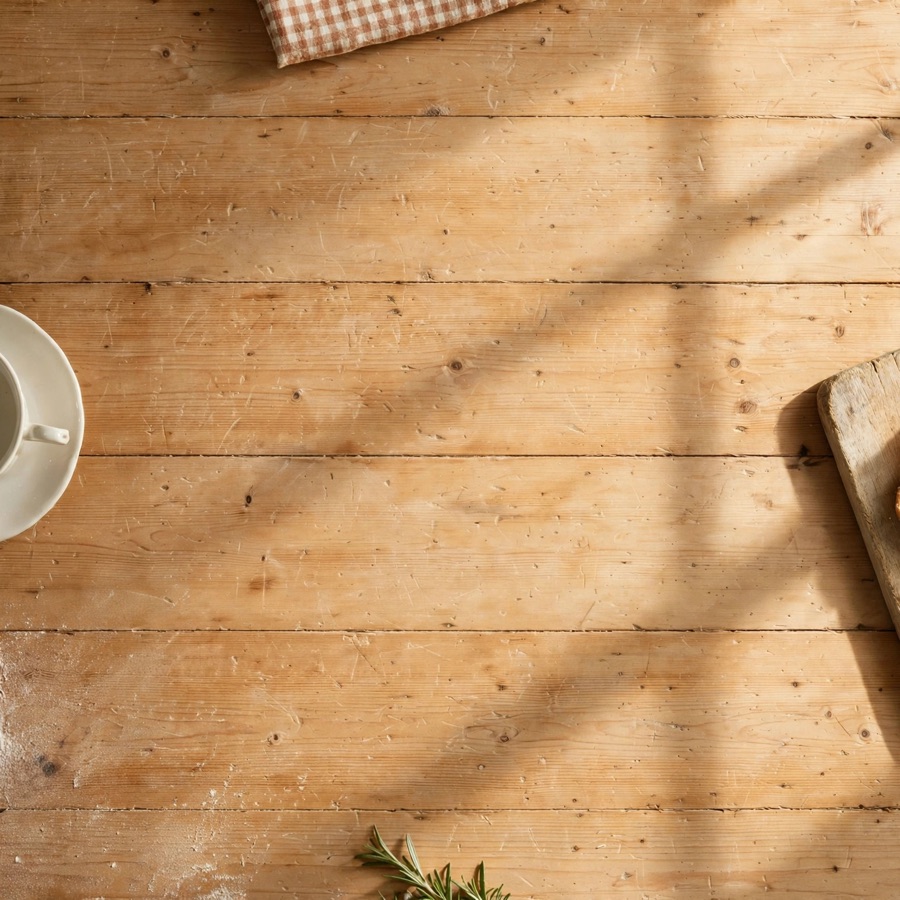
Both are now top-down. Flux leaves the props whole and pushes them into the corners. Muse, a multimodal model that plans before it draws, put one item on each edge, cropped each one and left the middle clear.
Marketing is where AI images get the most criticism
Posters, flyers and infographics are one of the most common uses for AI images. They’re also where it most often looks cheap.
- Gibberish. The Willy’s Chocolate Experience posters promised “catgacating” and “exarserdray”. The event itself was so far from the pictures that people called the police.
- Poor taste. A24’s AI-generated posters for Civil War drew criticism in April 2024. They showed scenes that weren’t in the film and had obvious errors, like a Chicago landmark rebuilt at the wrong angle. A lot of the anger was about a studio using AI instead of paying artists.
- Getting the facts wrong. Karen Spinner’s experiment turning a research paper into an infographic is a great example with all the prompts and source material shown. It ended up “basically usable”, but only after six attempts. Along the way the model misspelled words, ignored instructions about white space and filled every gap it could find. Her advice was to keep the copy short and proofread everything.
Making a poster that doesn’t look AI generated
So I set myself a challenge. Could I get a restaurant poster that wouldn’t immediately read as AI?
My first attempt was a screenprinted trattoria poster. Rather than describe a look, I described a real print process. Three flat spot inks on uncoated paper, slight misregistration, a scan rather than a photo, an off-centre composition and a named design tradition.
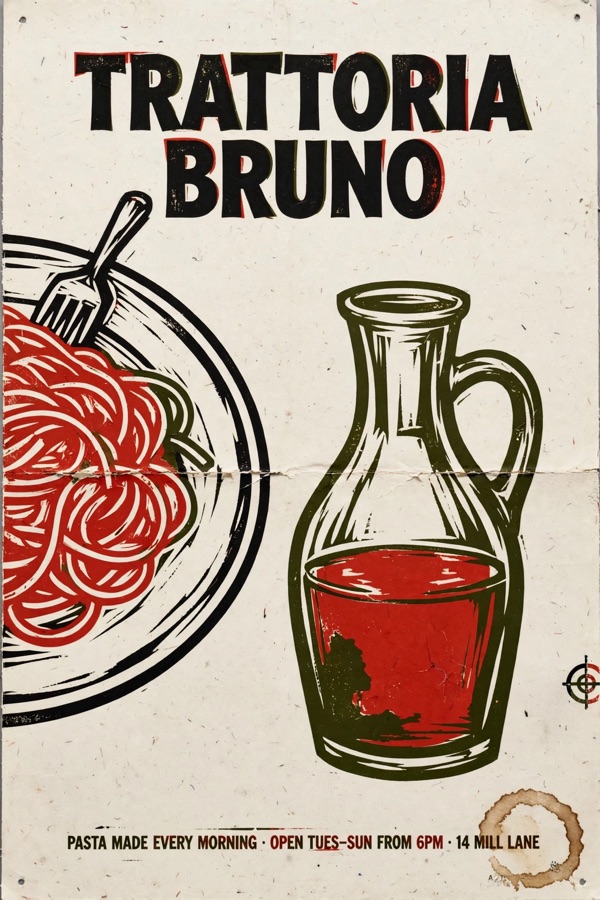
The ink texture is convincing. The bottom line looks like clean digital type but the fold crease may be too much.
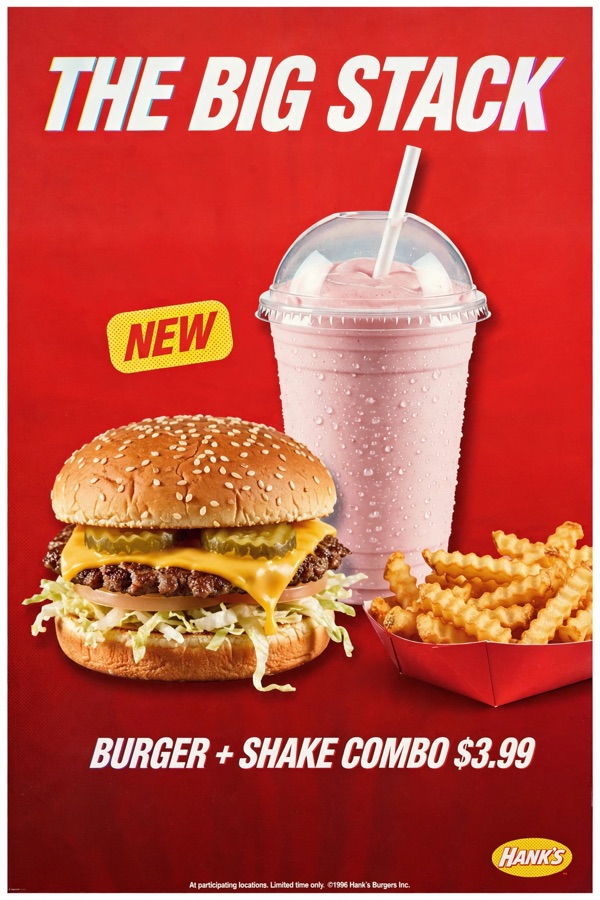
The harder test was a 90s burger poster with food that looks real. AI food tends to be too perfect, too glossy and too heroic. I asked for 1996 medium-format film photography and deliberately imperfect food, like a lopsided bun and pale winter tomatoes.
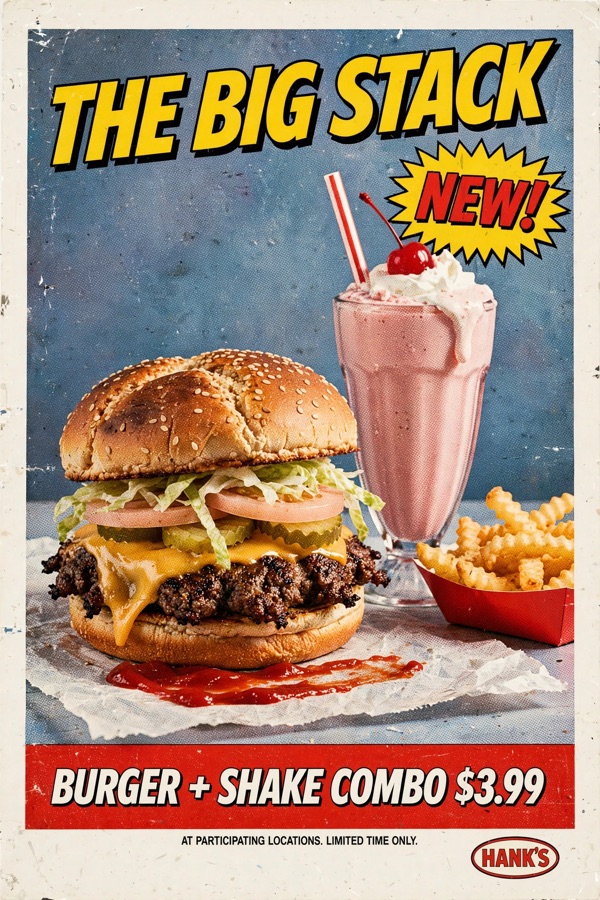
The first version had good food but read as a “vintage” filter, with comic lettering and fake wear. A real 1996 poster would have been clean and corporate.
So I made it boring. A pristine scan, a flat red background with an early-Photoshop gradient, a cut-out product photo with a slightly too-even drop shadow and plain heavy italic type. I even asked for it to look “competent and slightly bland”. That one would pass a casual glance. It isn’t quite 1996, because the shake is in a dome-lid cup you’d see in the 2010s.
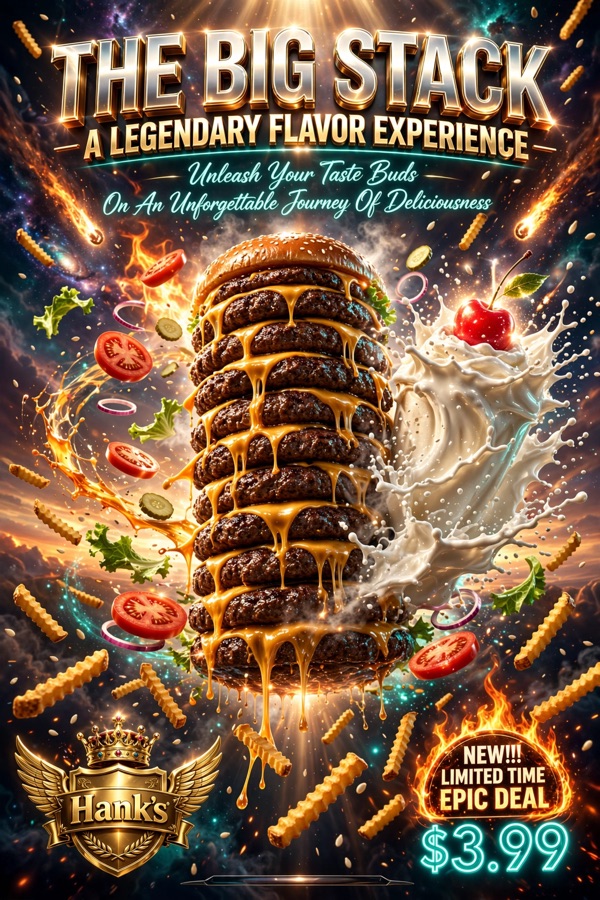
For balance, I asked for the worst version I could think of. Unreal Engine, volumetric god rays, floating ingredients and a galaxy. It delivered a dozen patties with no bottom bun, a shake with no glass and fries raining down from space. Unlike AI posters of old (2 years ago), the spelling is correct these days. The giveaway now isn’t the spelling. It’s that every element is turned up to the maximum.
Prompting rules of thumb
- Describe how it was made. Camera position, lens, film stock, lighting setup, print process and scanning give the model concrete constraints.
- Leave out the hype words. “Stunning”, “hyper-detailed” and “8K” push the model straight into the AI look.
- Be blunt about layout. Say what fills the frame, what’s visible and where each element goes.
- Real design is restrained. Asking for “slightly bland” did more than any amount of detail.
- Keep text short and exact. Put it in quotes, add “spell every word exactly as written” and proofread the result.
- Name period details. The model drifts towards modern objects unless you name the old ones.
- Generate two or three. Variants of the same prompt often differ a lot, and at a cent each, it’s cheaper than rewriting the prompt.
- Lock in a template for batches. Use the same style suffix and seed for every asset in a category so the batch doesn’t drift.
Pixel art
Pixel art and game sprites look like the easiest possible job for an image model. Small, simple, few colours. They turn out to be a great example of how AI image generation is harder than you would expect.
Pixel art is a style, not a format
A pixel art knight on Gemini 2.5 Flash Image took 7.5 seconds and cost about $0.039. It’s clean and convincingly retro.
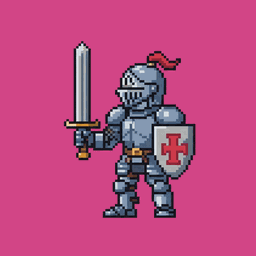
But it’s a 1024 x 1024 picture of a sprite, not a sprite. The “pixels” wobble in size, don’t sit on a true grid and use far more colours than a real palette. The “solid” magenta background was a slightly varying pink. To make it usable I still had to remove the background, snap it to a grid with nearest-neighbour downscaling and reduce the palette, all in ordinary code.
Many sprites on one canvas
If you pay per canvas and a sprite only needs a fraction of it, the obvious move is to ask for many sprites in one image. It’s cheaper and more consistent, because the model draws everything at once with the same palette and lighting.
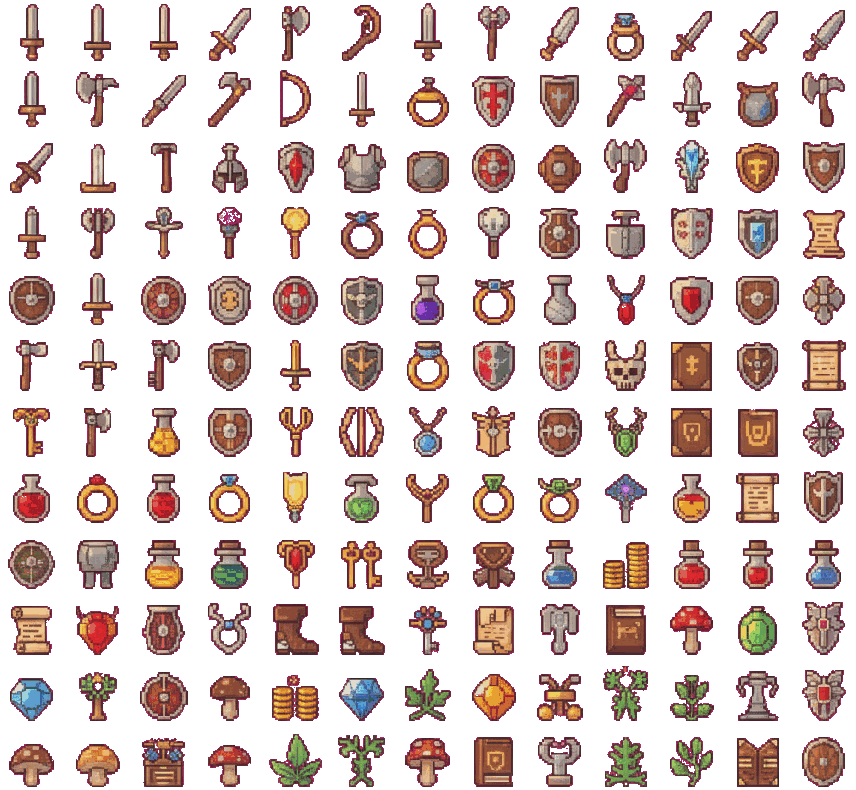
For a set of different objects it works brilliantly. I asked for 100 fantasy inventory icons and got 156, about 140 of them distinct, for one $0.039 call. That’s about $0.00025 per icon. Ordinary code then slices them by shape, removes the background and repacks them on a clean grid.
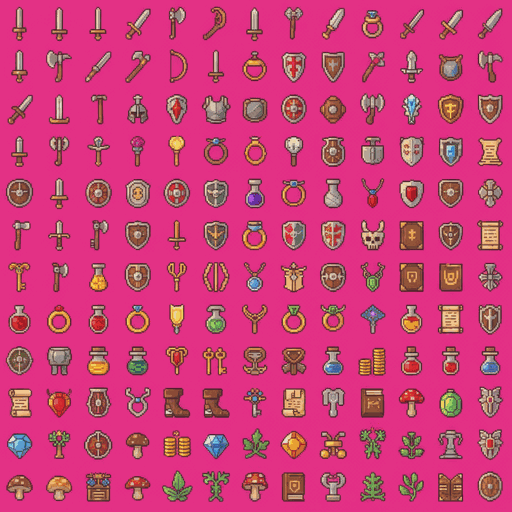
For one character in many poses it falls apart quickly. A 4 x 4 grid gave me about 13 distinct poses of the same knight. Asking for 10 x 10 gave me the same knight stamped 120 times.
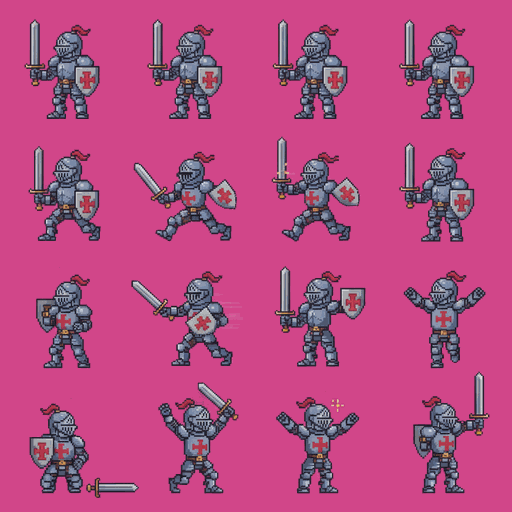
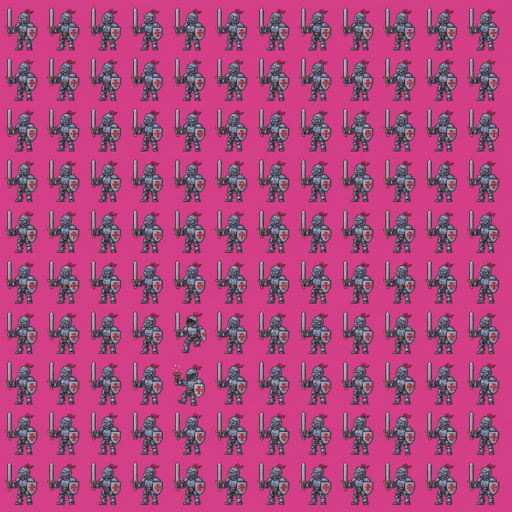
Here is what I learned from seven calls and about $0.27.
- The sweet spot is about 10 x 10 for sets of objects and 4 x 4 for character poses. Asking for more reduced both variety and quality.
- The model picks the grid, not you. I asked for 8 x 8 and got 6 x 6. Never slice on a fixed grid. Find sprites by shape.
- Scale everything together. If each sprite is resized to fill its own cell, a character grows and shrinks between animation frames.
Doing pixel art properly
What I did was a basic experiment with general models. If you need pixel art (a very specific type of image generation), there are better routes.
PixelLab is built for game developers. It draws real sprites at their actual size rather than a large picture that looks like pixel art. Palette, outline, camera angle and transparency are settings rather than prompt wording, and it can animate and rotate a character. It’s a subscription, so I didn’t use it here. Retro Diffusion is a similar commercial option.
To do it yourself, use a model add-on trained for pixel art such as Pixel Art XL, then shrink the result onto a clean grid and fix the palette in code. PixelOE can also turn any image into pixel art without AI. That works well for still images. Consistent animation is where the commercial tools are still ahead.
Where the line falls
Vectors are another format that looks easier than it is. An LLM can write SVG code cheaply, but characters come out crude because it’s describing a picture without seeing it. Dedicated text-to-vector models like Recraft look much better but cost more than raster images.
The general lesson from pixel art is that AI is good at “what should this look like?” and bad at “put exactly this in exactly this cell”. What matters isn’t how simple the output looks. It’s whether the hard part is creative or structural. Use the model for the creative part and code for the structure.
Integrating image generation into a coding project
Put a thin interface in front of every provider
Every API is different. OpenAI has an images endpoint. Gemini returns images inside a chat-style response. OpenRouter has two endpoints depending on the model. Local Flux is a Python library or a command line tool. Hide all of that behind one function so switching provider is a config change.
from dataclasses import dataclass, field
from typing import Protocol

from PIL import Image


@dataclass
class GenerationResult:
    image: Image.Image
    provider: str
    model: str
    prompt: str
    seed: int | None = None
    cost_usd: float | None = None
    metadata: dict = field(default_factory=dict)


class ImageProvider(Protocol):
    def generate(self, prompt: str, *, width: int, height: int, seed: int | None = None) -> GenerationResult: ...
Keep each provider’s quirks inside its own module. Base64 decoding, odd parameter names and fallback endpoints don’t belong in your app code.
Expect the ground to move
These all happened to me within a few months.
- Models disappeared. The Flux 2 models I planned to use vanished from OpenRouter between planning and building. Imagen 4 was shut down on the Gemini API. Gemini 2.5 Flash Image and gpt-image-1 got retirement dates, some with only weeks of notice. The Gemini deprecations page is worth bookmarking.
- Endpoints changed. OpenRouter moved dedicated image models to a separate
/api/v1/imagesendpoint. Calling them the old way returns a 404. My code now tries one and falls back to the other. - Parameters were ignored or rejected. Gemini ignored size and seed. OpenAI snaps to the nearest of a few fixed sizes. FLUX 3 Klein rejects a seed outright. Muse returned 1600 x 1600 when I asked for 1024 x 1024.
So keep the provider and model in config, never in code. Check the size and format of what came back rather than trusting what you asked for. Run a scheduled smoke test against each provider so you hear about a retirement before your users do.
Log everything
Record the prompt, model, parameters, output size, duration and cost for every image. Cost reporting is inconsistent. OpenRouter returns the billed amount. OpenAI and Gemini return token counts and leave the maths to you. Some return nothing. Without your own logging you only find out what you spent from the monthly bill.
Keeping the prompt and parameters with each image also means you can reproduce or tweak a good result months later.
Treat generation as a slow, failing job
- It’s slow. Anything from a few seconds to a minute. Don’t do it inside a web request. Put it on a job queue and notify the user when it’s done.
- It fails. Timeouts, rate limits, content refusals and the odd empty response. Retry with backoff, but treat a refusal as final rather than retrying the same prompt.
- It costs money per call. Cache results by a hash of the prompt and parameters. Put per-user limits on anything that lets users trigger generation.
Do the exact work in code
Use the model for the creative part only. Background removal (rembg), resizing, palette reduction, cropping, compositing text and packing sprite sheets are all free, fast and deterministic in Python. Most models can’t produce real transparency, so generate on a plain background and remove it. Some of OpenAI’s GPT Image models are an exception with a transparent background option.
If your image needs exact text, like prices or dates, consider generating the artwork without it and adding the text in code. It’s the one way to guarantee it’s spelled right.
Test without spending money
Use a fake provider that returns a fixed image in your unit tests. Keep real API calls for a small set of smoke tests. Use a cheap model for development and switch to the better one in production config.
Integrating with an agent
Image generation and AI agents fit together well. A multimodal agent can write a detailed prompt, call the model, look at the result, critique it and try again. That loop is the part that used to need a human.
Claude doesn’t generate images
If you are using Claude code, you should bear in mind that the built-in model won’t generate raster images like photos or paintings. Anthropic’s help centre says so plainly. Claude can view and analyse images and it can draw diagrams, charts and interactive visuals with code like SVG and HTML.
Its models are aimed at text, code and agents. Claude is very good at the parts around image generation, like writing a detailed prompt and judging whether the result match the brief. You connect it to a specialist image model through a tool and let each do what it’s good at.
Three ways to wire it up
- A command line tool. The simplest option. If your agent can run shell commands, give it a script like
python -m image_gen generate --model meta/muse-image --prompt "..."and tell it where the output goes. That’s what I did. - An MCP server. The Model Context Protocol lets you expose image generation as a tool to any MCP-compatible agent, such as Claude Code, Claude Desktop or Cursor. The agent sees a typed tool with a description rather than having to learn your script.
- Function calling in your own agent. If you’re building the agent yourself, define a
generate_imagetool in your LLM API call and run the generation when the model asks for it.
A minimal MCP server in Python looks something like this.
from mcp.server.fastmcp import FastMCP, Image

from image_gen.config import get_provider

mcp = FastMCP("image-gen")


@mcp.tool()
def generate_image(prompt: str, width: int = 1024, height: int = 1024) -> Image:
    """Generate an image from a detailed prompt. Costs about $0.01 per call."""
    result = get_provider("openrouter", model="meta/muse-image").generate(prompt, width=width, height=height)
    path = save_with_metadata(result)  # your own logging and storage
    return Image(path=path)


if __name__ == "__main__":
    mcp.run()
Returning the image itself, not just a file path, lets the agent see what it made.
How the experiments in this guide were run
Every image in this guide was made that way, using Claude Code as the agent with a small Python script for calling the providers. I described what I wanted in plain English. Claude wrote the detailed prompts, picked models from OpenRouter’s price list, ran the script, opened each image and told me honestly what was wrong with it. When OpenRouter changed its API mid-session it found the error, fixed the code and carried on.
Tips for agent-driven generation
- Let the agent write the prompts. LLMs are very good at turning “a 90s burger poster that doesn’t look AI” into a detailed, structured prompt. The poster prompts in this guide were written that way.
- Make sure it can see the output. The critique step is where the value is. An agent that can’t view the image is just a slow way of calling an API.
- Put the cost in the tool description. Agents make better decisions when they know a call costs a cent or 15 cents.
- Set a budget. A loop that keeps trying to improve an image can run up a bill. Cap the number of calls or the spend per session.
- Ask for honest critique. Ask the agent to list what’s wrong with each image, not just whether it’s done. It was the agent that spotted the 2010s milkshake cup in my 1996 poster.
- Keep the human on taste. The agent is good at checking an image against a brief. Deciding whether the brief was right in the first place is still your job.
Glossary
See also AI Glossary.
- Diffusion - Generating an image by starting from random noise and removing it step by step, guided by the prompt.
- Latent - The compressed internal canvas a diffusion model works on. The reason tiny output sizes don’t work.
- Steps - How many denoising passes a diffusion model makes. More is slower and usually better, up to a point.
- Distilled model - A model trained to produce good results in a few steps, like Flux Schnell or SDXL Turbo.
- Seed - The random starting point. Same seed, prompt and model gives the same image, where supported.
- Tokeniser - The part of a model that splits text into chunks. The reason older models couldn’t spell.
- Tokens - The unit a multimodal model counts output in. For images, a fixed number per size and quality.
- Open weights - A model you can download and run yourself, like Flux or SDXL.
- LoRA - A small add-on that teaches an open model a new style or subject without retraining it.
- ControlNet - A way to make a diffusion model follow a sketch, pose or depth map.
- Inpainting - Regenerating only a masked part of an image.
- C2PA - A metadata standard that records how an image was made, including whether AI was involved.
- SynthID - Google’s invisible watermark for AI-generated content.
- MCP - The Model Context Protocol, a standard way to give AI agents access to tools.
- Nearest-neighbour - A resize method that copies pixels rather than blending them. Essential for pixel art.
- Orthographic - A view with no perspective. Useful prompt language for top-down shots.
Resources
- OpenRouter image models - compare prices and try dozens of models with one API key
- OpenAI image generation guide - the GPT Image API
- Gemini image generation docs - Nano Banana and friends
- Gemini API deprecations - worth checking before you build on a Gemini model
- mflux - run Flux locally on Apple Silicon
- ComfyUI - node-based local workflows, including ControlNet and LoRAs
- Hugging Face Diffusers - the Python library behind most open-model tooling
- rembg - background removal in Python
- Replicate and fal.ai - cheap hosted open-weight models for big batches
- Model Context Protocol - for exposing image generation to agents
- C2PA - the content provenance standard
- Why AI image generators struggle to get text right - a readable explainer on the spelling problem
See also AI Agents, AI Assisted Coding and Machine Learning Models.