AI Assisted Coding
Reading 9 files…
✓ auth.py — simplified token logic
✓ tests/test_auth.py — 6 new cases added
✓ README.md — updated
3 files changed, 94 insertions(+), 71 deletions(-)
This is my attempt to make sense of the AI-assisted coding landscape. I wrote this to educate myself and as a reference for anyone trying to navigate this space without the hype.
- Resources or TLDR
- AI Coding Glossary
- The Evolution of Code Assistance
- How AI Coding Assistants Work
- How to Use an AI Coding Assistant
- The Landscape
- Building in a Safety Net
Resources or TLDR
Don’t want to read this or don’t have the time. Here’s a list of resources you might find generally useful or interesting…
AI experts
- Peter Steinberger - the guy who wrote OpenClaw
- Andrej Karpathy - the person who coined the term “Vibecoding”
- Addy Osmani - Director of Google Cloud AI
Docs
Misc
- Beyond Vibe Coding book
- Mind the gap: Closing the AI trust gap for developers (StackOverflow blog)
- ChatGPTCoding on Reddit
- Vibecoding on Reddit
- 8 best AI coding tools for developers (n8n blog)
AI Coding Glossary
See also AI Glossary
-
Agentic AI — An AI system that doesn’t just respond to a single prompt but takes sequences of actions autonomously
-
Cargo-Cult Programming — Writing code by copying patterns or snippets without understanding why they work, hoping the result will behave correctly by association. Named after the anthropological phenomenon of mimicking the form of something without grasping its function. Stack Overflow made this easy. AI tools risk amplifying it further.
-
Context Window — The maximum amount of text (code, instructions, conversation history) an AI model can “see” at once when generating a response. Measured in tokens.
-
Code Completion — A feature in IDEs that suggests the next token, method or block of code as you type, ranging from simple symbol lookup (early IDEs) to ML-ranked suggestions (PyCharm) to full-line and multi-line generation (Cursor).
-
Frontier models are the most advanced, large-scale, general-purpose AI systems that push the boundaries of current capabilities in reasoning, multimodality and scale. These high-cost models from companies like OpenAI, Anthropic and Google set the benchmark for intelligence and are considered the foundation of the AI industry.
-
Language Server Protocol (LSP) is an open, JSON-RPC-based protocol for use between integrated development environments (IDEs) and servers that provide “language intelligence tools”. The goal of the protocol is to allow programming language support to be implemented and distributed independently of any given editor or IDE. AI coding agents have since adopted LSP to gain the same rich code intelligence.
-
MCP (Model Context Protocol) — An open standard for connecting AI agents to external data sources and tools. With MCP, a coding assistant can be connected to Jira, Slack, Google Drive, Figma, or any custom internal tooling that exposes an MCP server. Increasingly supported across Claude Code, Cursor, Windsurf and other agentic tools.
-
Open-weight AI models are AI systems that provide public access to their trained parameters (weights), allowing users to download, run locally and fine-tune models without needing to train them from scratch.
-
Open-source AI models are machine learning models with publicly accessible weights, architecture and training code, allowing for free, customizable deployment, data privacy and no vendor lock-in. Popular, high-performance and versatile models include Llama and Mistral.
-
Static Analysis — Examining code without executing it, to infer types, detect errors or suggest completions. The basis of pre-AI tools like Rope and Jedi. Fast and deterministic, but limited by what can be known without running the program.
-
Vibe Coding — A term coined by Andrej Karpathy in early 2025 describing a style of development where the programmer describes intent in natural language and largely accepts whatever the AI generates, iterating through prompts rather than writing code directly. Prioritises speed and outcome over deep understanding of the implementation.
-
Zero-shot / Few-shot Prompting — Zero-shot means asking an AI to perform a task with no examples, relying purely on its training. Few-shot means providing one or more examples in the prompt to demonstrate the desired pattern or output format before asking it to continue. Few-shot reliably improves output quality for structured or stylistically specific tasks.
The Evolution of Code Assistance
Paper Manuals & Reference Books The original developer companion. You’d thumb through language references, API docs or O’Reilly books to find the right method signature to understand a concept.
Online IDE Documentation & Language References As the web matured, documentation moved online. IDEs integrated this so you could hover over a symbol and get inline docs pulled from docstrings or type stubs. Still reactive, but dramatically faster. The shift to hyperlinking meant you could follow a rabbit warren of related APIs in minutes rather than flicking through an index.
Copying from Stack Overflow, GitHub & Open Source Arguably the most impactful “tool” of the mid-2000s to 2010s developer toolkit. Developers were simultaneously mining GitHub for open source repositories and reading through Stack Overflow. Stack Overflow gave you explained snippets and GitHub gave you full working implementations you could study in context. For coding capability, today’s AI models are heavily dependent on the content of Stack Overflow and GitHub.
Early Code Completion (2000s IDEs) Tools like early Eclipse, Visual Studio and IntelliJ began offering basic autocomplete, typically triggered by typing a dot after an object. The engine was largely syntax-aware symbol lookup. Useful for reducing typos in method names but rarely capable of suggesting whole patterns or intent.
Autocompletion Before AI — Jedi & Rope Python’s dynamic typing made static autocompletion genuinely hard. Early tools like Rope and later Jedi tackled this with deep static analysis. They’d trace variable assignments, follow imports, infer types through call chains and build an in-memory symbol index. Jedi in particular became the backbone of completion in editors like Vim, Emacs, Atom and VS Code.
Autocompletion — Using AI The landscape shifted significantly when GitHub launched GitHub Copilot in 2021, generating entire functions and suggesting multi-line logic from natural language comments rather than simply ranking symbol candidates. This felt less like autocomplete and more like pair programming. The impact was immediate. Others followed, marking a broad industry shift from smarter symbol ranking toward tools that could genuinely reason about developer intent.
Copying and Pasting into ChatGPT (Pre-Agentic) When ChatGPT launched publicly in late 2022 it changed developer workflows overnight, even in its most primitive form. The pattern was: copy a function or error message, paste it into the chat window, describe what you wanted and get back working code with an explanation. For the first time you could have a conversation about your code, ask follow-up questions, request a refactor or say “that didn’t work, here’s the error.” It was a dramatic leap over Stack Overflow for anything non-trivial, because the response was tailored to your exact situation.
Agentic tools like Claude Code operate at a fundamentally different level. Rather than completing tokens or ranking symbols, it understands intent across an entire codebase. You describe what you want in plain language, and it can generate, refactor, debug and explain across multiple files simultaneously. It holds context about your architecture, naming conventions and patterns. It reasons about why code works, not just what comes next. Used via the CLI, it can run commands, read outputs and iterate — behaving less like a tool and more like a junior engineer pair-programming alongside you.
The Near Future — Agents with Persistent Context The next step is likely persistent, project-aware agents that maintain a living model of your codebase between sessions. Think less “answer my question” and more “autonomous collaborator” that files its own PRs, writes tests as code changes and flags when a new feature conflicts with an architectural decision made six months ago.
The Speculative Horizon — Self-Improving Systems Further out, the boundary between tool and team blurs. Models could be trained continuously on a specific codebase rather than through prompting. The frontier question isn’t capability, it’s trust and verifiability. How do you confidently delegate to a system you can’t fully inspect? The tools that win will likely be the ones that make their reasoning transparent enough that engineers stay in control of the craft, even as the mechanical labour of coding largely disappears.
How AI Coding Assistants Work
It is easier to use an AI assistant if you first understand how they work. That’s why this section comes before How to Use an AI Coding Assistant.
The label “AI coding assistant” currently covers everything from a light autocomplete plugin to a fully autonomous agent. Choosing the right tool depends entirely on what you’re trying to do.
The Spectrum of Assistance
It helps to think of AI coding assistants as sitting on a spectrum from ambient/reactive at one end to agentic at the other.
At the reactive end, tools like GitHub Copilot (in its traditional form) sit close to your cursor. They observe what you’re typing, infer your intent from the surrounding code and comments, and suggest completions inline. The interaction model is passive: you write, it suggests, you accept or ignore.
At the agentic end, tools like Claude Code and Lovable take a fundamentally different approach. Rather than predicting the next token of your code, they reason about goals, decompose tasks into steps, invoke tools, observe the results and decide what to do next. This is what makes them agents rather than autocomplete engines.
How Agentic Tools Work
The agentic coding loop:
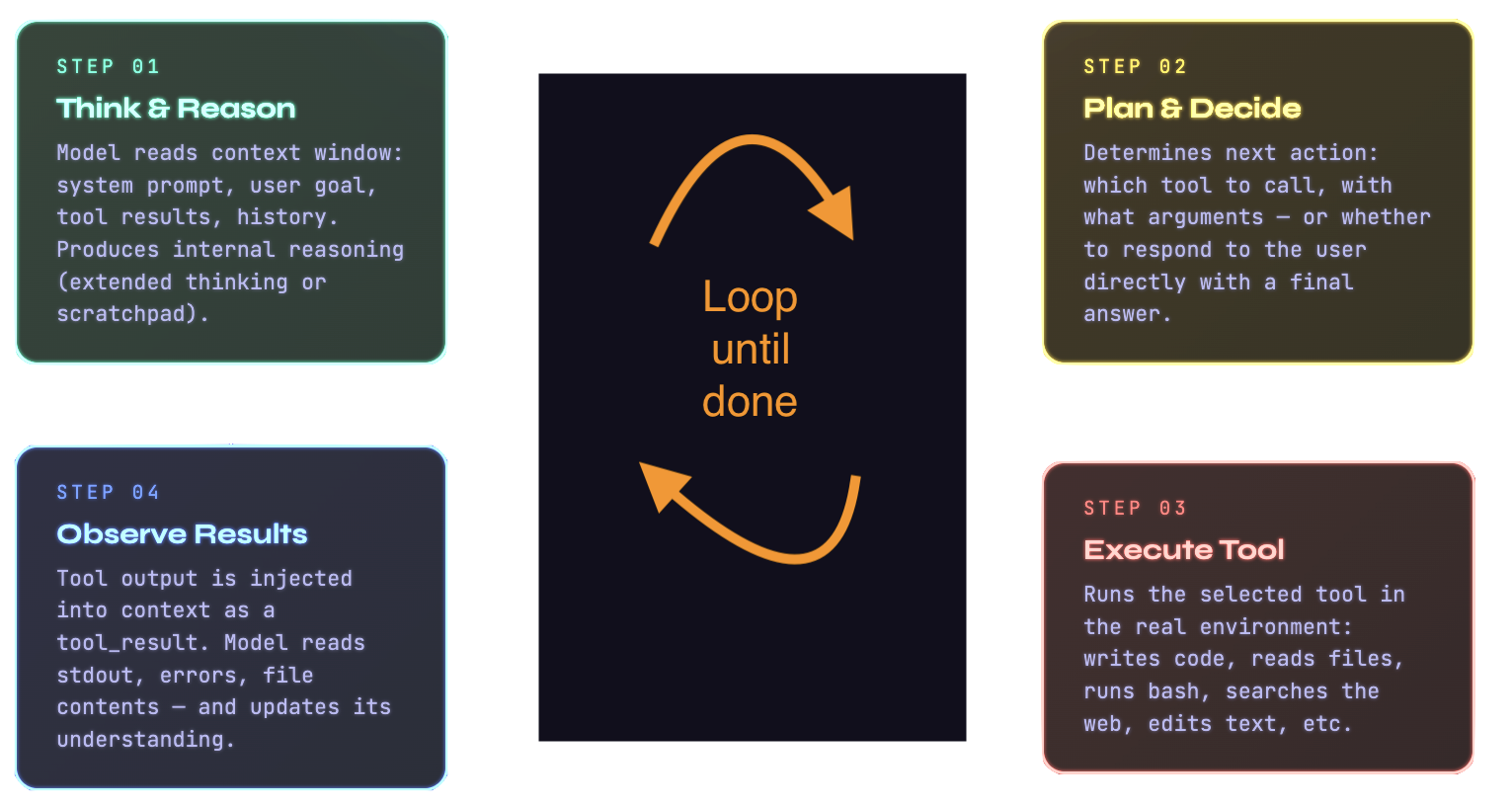
The engine underneath an agentic coding assistant is an LLM equipped with a set of tools it can call (or more accurately, tools it can tell the agent to call). When you give Claude Code a task, it doesn’t just generate text. It generates decisions about what actions to take. These might include reading a file, running a shell command, searching the codebase for a pattern, fetching documentation from the web or editing a file. Each action produces a result that is fed back into the model’s context, informing the next decision.
An agentic tool reads your codebase, edits files, runs commands and integrates with your development tools. The underlying mechanism is a continuous loop. The model maintains a running view of the task, decides on the next tool call, executes it, processes the result and iterates until the task is complete, or it needs your input.
The key insight is that the model’s intelligence is applied repeatedly, with fresh information each time, informed by
real results from the environment. This is what allows agentic tools to handle genuinely complex, multi-file tasks.
Project-specific context can be injected into this loop at initialisation. Claude Code, for instance, reads a
CLAUDE.md file from your project root at the start of every session, shaping every decision it makes.
Generation, Not Assistance
Tools like Lovable occupy an interesting and distinct position on this spectrum. Where Claude Code is designed to work within your existing codebase, Lovable is primarily a generative tool aimed at building applications from scratch through conversation. You describe what you want, and it produces a full-stack application.
The difference in philosophy is significant. Lovable is optimised for the early, greenfield phase of a project, where you’re moving quickly from idea to working prototype and the codebase doesn’t yet have accumulated conventions or complexity. Claude Code is optimised for the sustained development phase. Both are powered by LLMs with tool access, but they are designed for different moments in a project’s life and make different trade-offs.
AI-Native IDEs
Tools like Cursor (cursor.com) replace the editor itself rather than operating in the terminal or as an extension. Built as a fork of VS Code, Cursor embeds AI as a first-class participant in how you navigate, write and refactor code.
The Role of the Context Window
Every LLM-based tool, regardless of where it sits on the spectrum, is fundamentally constrained by its context window. For agentic tools, managing this window intelligently is one of the core engineering challenges.
A large repository can contain millions of tokens worth of code. The model can’t read all of it at once. Agentic tools
therefore need strategies for deciding what to include in the context at any moment. Common approaches include
semantic search (finding the most relevant files by embedding similarity), language server protocol (LSP) integration to
understand code structure and relationships and explicit user-directed context attachment (the @filename pattern).
OpenCode automatically loads the right LSPs for the LLM, which is one example of how tools are
increasingly automating this context management on your behalf.
The context window also explains why session management matters. Longer sessions accumulate more history, which consumes window space that could otherwise be used for relevant code. Well-designed tools handle this through summarisation, selective history pruning and the ability to resume sessions with their key decisions intact without replaying every token.
Model Context Protocol
One architectural development worth understanding is the Model Context Protocol (MCP), an open standard for connecting AI agents to external data sources. With MCP, a coding assistant isn’t limited to your local files. It can be connected to your Jira board, your Slack workspace, your Google Drive, your Figma designs or any custom internal tooling that exposes an MCP server.
This is significant because it shifts the agent’s effective context from “what’s in this repository” to “what’s in your entire development environment.” The agent becomes a genuine participant in your workflow rather than an isolated tool that only knows about code files.
This also speaks to the growing utility of AI coding tools to do a lot more than editing code. OpenClaw is an agent that takes this paradigm to extremes.
Putting It Together
The fundamental difference between a tool like GitHub Copilot and a tool like Claude Code or OpenCode is the degree to which reasoning is externalised from a single forward pass into a multi-step loop with real-world tool use. Copilot applies intelligence once, inline, in a fraction of a second. An agentic tool applies intelligence repeatedly, across minutes or longer, with each step informed by the results of the last.
Both are useful. The right choice depends on the task. For fast, flow-state coding where you want suggestions without interruption, a reactive autocomplete tool is often the better fit. For complex, multi-file work where you need something that can genuinely understand a problem and work toward a solution, an agentic tool is more appropriate.
For the earliest phase of a project, a generative tool like Lovable may be the right starting point before you hand the codebase over to something with deeper editing and reasoning capabilities.
How to Use an AI Coding Assistant
“Imagine you’re talking to a capable but context-blind colleague who has just walked into your project for the first time…“
Starting with the Right Mental Model
Context is everything. Context costs tokens. Tokens cost money!
AI coding assistants operate within a finite amount of text they can “see” at any one time. Your questions, the code you’re working on, any files you’ve shared, prior conversation and the assistant’s own responses need to fit within that window. When the context fills up, older information falls away.
The assistant doesn’t remember last session’s decisions. It doesn’t know your project’s conventions, your team’s opinions or the architectural choices made six months ago, unless you tell it.
Customising Your Assistant
Most AI coding tools offer several layers of customisation, and taking the time to set these up properly pays dividends on every interaction.
System-level or project-level instructions are the most powerful lever you have. In Claude Code, for instance, you
can create a CLAUDE.md file in the root of your project. This file is read at the start of every session and can
contain anything you’d want a new developer to know before touching your codebase, such as:
- The tech stack
- Coding conventions,
- Which directories to leave alone
- How tests are structured
- Which commands to run to start the dev server
… think of it as your project’s onboarding document for the AI. The difference between a session that starts with this context and one without, is that you stop spending tokens and wasting time re-explaining the same thing.
Beyond project-level files, most tools allow you to configure permission levels (whether the assistant can run shell commands, edit files autonomously or only make suggestions), model selection (trading off speed against quality depending on the task) and tool access (whether the assistant can browse the web, read connected services like Jira or Google Drive via integrations such as MCP servers).
Custom commands and slash commands are another underused feature. Claude Code lets you define custom /commands
that encapsulate common workflows like
- Running your test suite
- Generating a summary of recent changes
- Triggering a code review prompt against your own standards
The Token Economy: Where People Go Wrong
Tokens are the currency of AI interactions. You’re charged for them financially and constrained by them architecturally. Wasting tokens on unnecessary content makes the tool slower, more expensive and sometimes less accurate as useful information gets crowded out. Here are the most common mistakes:
Pasting entire files when only a function is relevant. If you’re asking about a bug in a 40-line function, you don’t need to include the entire 800-line module. Be surgical.
Repeating context that’s already been established. Once you’ve explained your stack and architecture, you shouldn’t keep re-stating it in every message. This is also what project-level markdown files solve.
Ignoring conversation history bloat. Long, meandering sessions accumulate tokens fast. Every message in the conversation history is re-sent to the model on each turn. If you’ve spent thirty messages debugging a side issue, consider starting a fresh session once that’s resolved rather than carrying all that history forward into an unrelated task.
Asking for broad rewrites when targeted edits would do. “Refactor this entire service” consumes far more tokens than “Extract the database logic from this controller into a separate repository class.” The more specific your request, the more efficient and accurate the response.
Not using Plan Mode or equivalent. Many tools offer a mode where the assistant describes what it intends to do before doing it. This is invaluable. It lets you catch misunderstandings before the assistant has burned tokens (and potentially made changes) on the wrong approach.
Planning as a First-Class Activity
One of the biggest mindset shifts in working well with AI coding assistants is learning to plan before you prompt.
Before starting a significant task, it’s worth spending a few minutes writing down in plain language what you’re trying
to achieve, what constraints apply and what a successful outcome looks like. You can put this directly into your prompt,
or better yet, maintain a TASKS.md or PLANNING.md file in your project that evolves as the work progresses.
This approach has several compounding benefits. It forces you to think clearly about scope, which surfaces ambiguities before the assistant has a chance to make confident wrong assumptions. It gives the assistant a clear success criterion to work toward. And it creates a written record you can refer back to if a session goes sideways.
Some developers go further, maintaining a suite of markdown files that together form a kind of living project memory: an
ARCHITECTURE.md covering high-level design decisions, a CONVENTIONS.md for style and naming rules, a DECISIONS.md
logging why certain approaches were chosen and a PROGRESS.md tracking what’s done and what’s next. These files make
every new session dramatically more productive because the assistant has genuine context to work with rather than having
to infer everything from the code alone.
Asking Well
Clear, specific prompts produce better results than vague ones. They generate responses based on the probability distribution of what plausibly follows your input. Vague inputs lead to generic outputs.
Useful habits include:
- Be explicit about what you already know
- Specify the format you want for the response
- Break complex tasks into discrete steps
- Use the
@filenamepattern to attach precise context - If a response isn’t right, refine the prompt rather than argue with the output
The Landscape
AI Coding Tools
| Tool | Description |
|---|---|
| Claude Code | Uses Anthropic models. Agentic coding tool that lives in your terminal. Reads, edits and reasons across entire codebases. |
| Codex CLI | Open source. Uses OpenAI’s models. Terminal coding agent built in Rust. Reads, edits and runs code in your local directory with configurable approval modes. Supports multimodal input, web search and MCP. |
| Cursor | AI-native code editor (VS Code fork). Composer mode handles multi-file edits autonomously. Tab completion predicts entire functions. |
| Lovable | Browser-based platform that turns natural language prompts into full-stack React/Supabase apps. No local setup required. |
| Gemini CLI | Open source. Uses Google’s Gemini models. Terminal coding agent that uses a ReAct loop to plan and execute multi-step tasks from your shell. Integrates with MCP servers and Google Search. |
| GitHub Copilot | The OG AI coding tool, but now out of fashion. Not to be confused with all the other Copilots. Integrated into VS Code, JetBrains and the GitHub ecosystem. Covers inline completions, chat, agent mode and PR summaries. |
| Devin | Built on OpenAI models with proprietary RL fine-tuning. Autonomous software engineer that operates independently via Slack or a VSCode-style interface, spawning its own environment to plan, code, test and open PRs. |
| Replit | Uses multiple models. Browser-based IDE with built-in hosting, databases and deployments. Replit Agent can build and deploy full-stack apps from a prompt. |
| Amazon Q Developer | Uses Amazon’s proprietary models. AWS-native AI coding assistant with deep integration into AWS services and IDEs. |
| Aider | Open source. Model-agnostic. Terminal coding agent. Stages git changes and writes commit messages automatically. |
| Cline | Open source. Model-agnostic. VS Code extension acting as an agentic coding assistant. Shows diffs inline and requires explicit approval before running terminal commands. |
| OpenCode | Open source. Model-agnostic. Connects to other models or log in with an existing Copilot or ChatGPT subscription. Terminal, IDE and desktop coding agent. LSP-aware, multi-session and privacy-first. |
Models that perform well at coding
Several benchmarks track coding and general model capability. The most useful ones:
- SWE-bench — measures how often a model can resolve real GitHub issues autonomously
- GSO Bench — General Software Operations
- LiveCodeBench — live competitive programming problems, updated continuously to prevent data contamination
- LiveBench — general LLM benchmark using fresh, verifiable questions updated monthly
- Epoch AI Benchmarks — tracks long-run AI progress across a wide range of capability benchmarks
- Vellum LLM Leaderboard — practical comparison of frontier models across quality, speed and cost
The table below shows the current SWE-bench leaderboard (February 2026), ranked by resolution rate.
| Model | Org | % Resolved | Avg. cost |
|---|---|---|---|
| Claude 4.5 Opus (high reasoning) | 🇺🇸 Anthropic | 76.8% | $0.75 |
| Gemini 3 Flash (high reasoning) | 75.8% | $0.36 | |
| MiniMax M2.5 (high reasoning) | 🇨🇳 MiniMax | 75.8% | $0.07 |
| Claude Opus 4.6 | 🇺🇸 Anthropic | 75.6% | $0.55 |
| GLM-5 (high reasoning) | 🇨🇳 Zhipu AI | 72.8% | $0.53 |
| GPT-5-2 (high reasoning) | 🇺🇸 OpenAI | 72.8% | $0.47 |
| GPT 5.2 Codex | 🇺🇸 OpenAI | 72.8% | $0.45 |
| Claude 4.5 Sonnet (high reasoning) | 🇺🇸 Anthropic | 71.4% | $0.66 |
| Kimi K2.5 (high reasoning) | 🇨🇳 Moonshot AI | 70.8% | $0.15 |
| DeepSeek V3.2 (high reasoning) | 🇨🇳 DeepSeek | 70.0% | $0.45 |
| Claude 4.5 Haiku (high reasoning) | 🇺🇸 Anthropic | 66.6% | $0.33 |
| GPT-5 Mini | 🇺🇸 OpenAI | 56.2% | $0.05 |
Source: swebench.com, February 2026. Scores use the mini-SWE-agent v2.0.0 scaffold.
Notes on Chinese models
These are open-weight, compete with but are generally smaller than frontier models and originate from China:
- MiniMax from MiniMax
- GLM from Zhipu AI (z.ai)
- Kimi from Moonshot AI
- DeepSeek from DeepSeek
- Qwen from Alibaba
Pros:
- API pricing is significantly cheaper than OpenAI, Anthropic or Google
- Open weight models can be run locally with no API costs at all or on hourly cloud compute with a trusted partner
- Performance on coding tasks is genuinely competitive
Cons:
- If you use the hosted API versions, your code is processed on Chinese infrastructure. For anything sensitive, this is a meaningful concern
- The models may not have had the same level of independent security auditing as Western counterparts
- It is believed that some or all of these models are at least partially built using “distillation” (see here). As this could be considered a form of intellectual property theft, their use may be frowned upon when working with certain clients
Building in a Safety Net
Vibe coding and other types of automated code generation introduce the risk that you end up with unmaintainable code, non-working code or working code containing security or performance issues.
This is where automated tooling becomes not just useful but arguably essential. In my opinion, there are four levels to this:
- Quick to run and free static analysis tools
- Quick to run unit testing
- Slower to run and more expensive code analysis tools
- Slower to run and harder to set up tests
Quick to run and free static analysis tools
This is a no-brainer. Linting tools have been around for years, they are generally free and you can run them in seconds on any modern hardware and for free in Github actions. I like to include mine in a pre-commit file so that I don’t forget to run it.
Here are some examples of the sort of tools you can use (a more extensive list is available here):
- Ruff is a fast Python linter and formatter. It catches style issues, unused imports and obvious bugs.
- Bandit analyses Python code for common security issues.
- Semgrep is more powerful and language-agnostic. It uses rules to detect patterns
across a codebase and has a large library of security-focused rules. For JavaScript, ESLint with the
eslint-plugin-securityplugin covers similar ground.
Here’s an example pre-commit for a Python project setup that will provide an initial safety net for AI-generated code:
repos:
  # --- Ruff: fast Python linter + formatter (replaces flake8, isort, pyupgrade, etc.) ---
  - repo: https://github.com/astral-sh/ruff-pre-commit
    rev: v0.15.2
    hooks:
      - id: ruff-check
        args: [--fix, --exit-non-zero-on-fix]
      - id: ruff-format

  # --- Bandit: security-focused static analysis ---
  - repo: https://github.com/PyCQA/bandit
    rev: 1.9.3
    hooks:
      - id: bandit
        args: [-c, pyproject.toml]
        additional_dependencies: ["bandit[toml]"]

  # --- Semgrep: semantic code analysis / security patterns ---
  - repo: https://github.com/semgrep/semgrep
    rev: v1.152.0
    hooks:
      - id: semgrep
        language_version: python3.12
        args:
          - --config=p/python
          - --config=p/secrets
          - --error
          - --quiet

  # --- Basic file hygiene (near-zero cost, built-in hooks) ---
  - repo: https://github.com/pre-commit/pre-commit-hooks
    rev: v6.0.0
    hooks:
      - id: trailing-whitespace
      - id: end-of-file-fixer
      - id: mixed-line-ending
        args: [--fix=lf]
      - id: check-yaml
      - id: check-toml
      - id: check-json
      - id: check-merge-conflict
      - id: check-added-large-files
        args: [--maxkb=500]
      - id: check-case-conflict # catches case-insensitive filesystem issues
      - id: check-symlinks
      - id: detect-private-key # catches accidentally committed keys
      - id: debug-statements # catches leftover breakpoint() / pdb calls
      - id: check-ast # validates Python files parse correctly
      - id: check-docstring-first # catches code before module docstrings
      - id: name-tests-test # enforces test_*.py naming convention
        args: [--pytest-test-first]

  # --- Pyupgrade: modernise Python syntax automatically ---
  - repo: https://github.com/asottile/pyupgrade
    rev: v3.21.2
    hooks:
      - id: pyupgrade
        args: [--py311-plus] # adjust to your minimum Python version

  # --- Dead code detection ---
  - repo: https://github.com/jendrikseipp/vulture
    rev: v2.14
    hooks:
      - id: vulture
        args: [--min-confidence=80, "--exclude=.venv", .]

  # --- pip-audit: check dependencies against known CVEs ---
  - repo: local
    hooks:
      - id: pip-audit
        name: pip-audit
        language: system
        entry: uv run pip-audit --local
        pass_filenames: false

default_language_version:
  python: python3.14
Quick to run unit testing
Unit testing is non-negotiable in modern software development, and AI tools have made high coverage levels more achievable than ever with an iterative approach rather than a one-shot attempt. Feed the AI your function signatures, docstrings and intent, then ask it to surface edge cases, boundary conditions and failure modes you might not have considered. Also, consider hand-writing or partially hand-writing some tests to stay close to what the code is actually supposed to do.
Aim for above 90% coverage but treat the test suite as documentation as much as a metric. Does it describe your problem domain and tell a story about what the system should do? If you find yourself patching function calls, it is usually a signal of a design problem worth addressing. This is because reducing side effects and injecting dependencies explicitly tends to produce code that is easier to test and better structured too.
A few rules worth following
- Every file should have a corresponding test file
- Target 90% coverage as a minimum and treat any drop as worth investigating
- Generate tests from descriptions first then iterate by asking the AI to find edge cases you missed
- Write some tests by hand to stay close to what the code is actually supposed to do
- Read your test suite as documentation and make sure it describes the problem not just the implementation
- Treat the need for patching as a design smell to fix in the production code
- Run coverage checks in your pre-commit hooks or CI pipeline, so regressions don’t slip through
Slower to Run and More Expensive Code Analysis Tools
These fall into a few distinct categories, and using them all could be expensive. It is worth thinking about which layer actually applies to your situation before reaching for your wallet.
AI PR Reviewers
This is the most relevant category right now. CodeRabbit is the current market leader in purpose-built AI code review. It installs as a GitHub or GitLab app, runs automatically on every pull request and leaves line-by-line comments with severity rankings and one-click fixes. It is free for open source and around $19 per user per month for private repos. A study of 309 pull requests from November 2025 put it at the top for accuracy and the free tier for open source is genuinely useful on its own merits.
GitHub Copilot Code Review was added in April 2025 and is now bundled into existing Copilot subscriptions. It added CodeQL and ESLint integration later that year. It is shallower than CodeRabbit because it works from the diff rather than the full codebase so it can miss cross-file concerns, but if you are already paying for Copilot then turning it on costs nothing extra.
Cursor BugBot is an automated AI code review agent that analyses GitHub pull requests for logic bugs, security vulnerabilities and performance issues, operating independently of the local Cursor editor application. It runs in the background on GitHub, requiring repository-level integration and configuration via the Cursor web dashboard.
SAST Platforms
These go beyond pattern matching into proper security analysis. SonarQube and SonarCloud are the established standard for combining code quality and security into a single dashboard. The Community Edition is free and self-hosted. The strength over tools like Ruff or Semgrep is the quality gate system which can block deployments when coverage or reliability drops below thresholds you define.
Snyk Code takes an AI approach trained on millions of open source repositories. The key differentiator is data-flow analysis. It can catch things like second-order SQL injection where tainted data passes through multiple functions before hitting a sink, which pattern matching tools will miss entirely. It also bundles dependency scanning, container scanning and infrastructure-as-code analysis into a single platform.
GitHub Advanced Security with CodeQL is worth knowing about if you are already on GitHub. CodeQL is a full semantic query language for finding vulnerabilities rather than just matching patterns. It is free for public repositories and the query language is powerful, though it has a steep learning curve.
Dependency and Supply Chain Security
Dependabot is free, built into GitHub and opens automatic pull requests for vulnerable dependencies with zero configuration. It is worth enabling if you have not already. For more serious supply chain concerns, Socket.dev analyses the behaviour of npm and PyPI packages and can detect things like packages that exfiltrate data at install time. It has a free tier and a GitHub app.
What to Actually Prioritise on a limited budget
If you are working with financial constraints, the decision is fairly straightforward. Turn on Dependabot first because it is free and takes minutes. Try the CodeRabbit free tier on any public repositories because the five minute install is worth it. If you move into a team or client environment then SonarCloud offers the best value for quality gates on private projects and Snyk is the strongest option if you need dependency scanning and static analysis bundled together.
Slower to Run and Harder to Set Up Tests
These are the tests that have a higher setup and/or running costs than those which you would typically run on every push, such as a unit test suite.
Integration tests, end-to-end tests and contract tests all fall into this category. They are slower to run, harder to maintain and require more infrastructure to support, but they catch an entirely different class of bug to unit tests.
Purely quick-running tests tell you nothing about whether the system works correctly when connected to a real database, a third-party API or another service in your system.
Integration Tests
Integration tests verify that your code works correctly with the real systems it depends on. The most practical approach is to use lightweight local versions of those dependencies wherever possible. Docker Compose is the standard tool for this and it lets you spin up a real Postgres instance, a Redis cache or a message queue locally or in CI without much ceremony. Libraries like pytest-docker make it straightforward to wire this into a pytest run.
For Python projects testcontainers-python is worth knowing about. It programmatically spins up Docker containers from within your test suite so the infrastructure lives alongside the tests rather than in a separate configuration file. The setup overhead is front-loaded but once it is in place adding new integration tests is no harder than writing unit tests.
End to End Tests
End-to-end tests exercise your system the way a real user would. For web applications, Playwright is the current tool of choice. It supports Python, JavaScript and TypeScript, runs headlessly in CI and has a codegen feature that records browser interactions and outputs test code automatically. That last feature makes it a natural fit for AI assisted workflows where you can describe a user journey and generate a skeleton test to refine from.